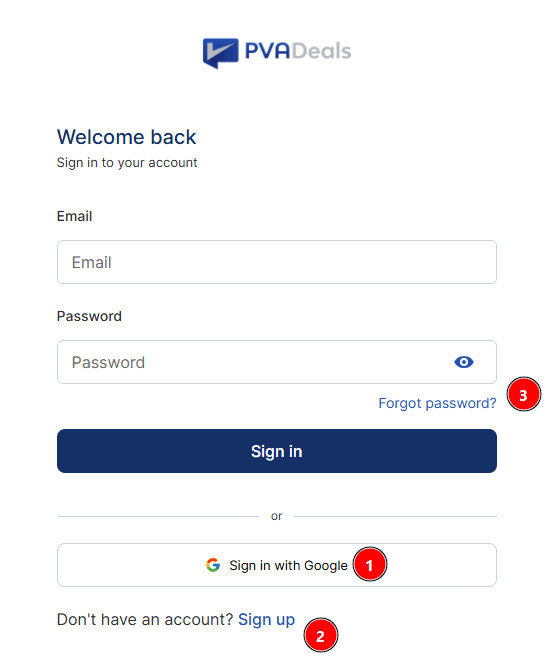
Sign in with Google: Log in instantly using your Google account - no password needed. Click the button, pick your Google account, and you’re in. If it’s your first time, an account is created automatically.
Sign up using email: New to PVADeals? Click Sign up, enter your name, email, and country. We’ll send a verification email — click the link (valid 15 min) to set your password and you’re in.
Forgot password: Can’t remember your password? Click Forgot password?, enter your email, and check your inbox for a reset link (valid 15 min). Click it, set a new password, and sign in.
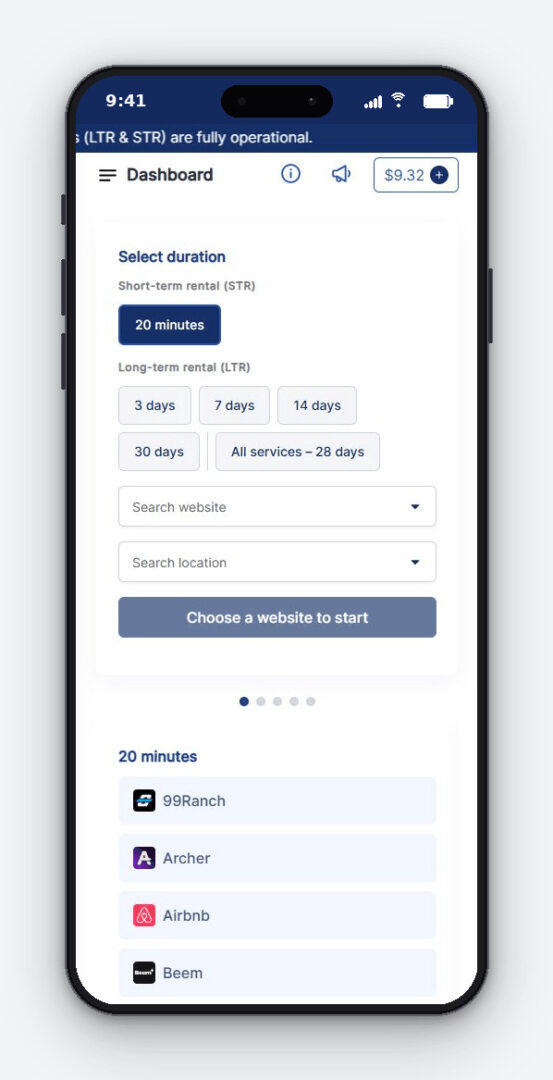
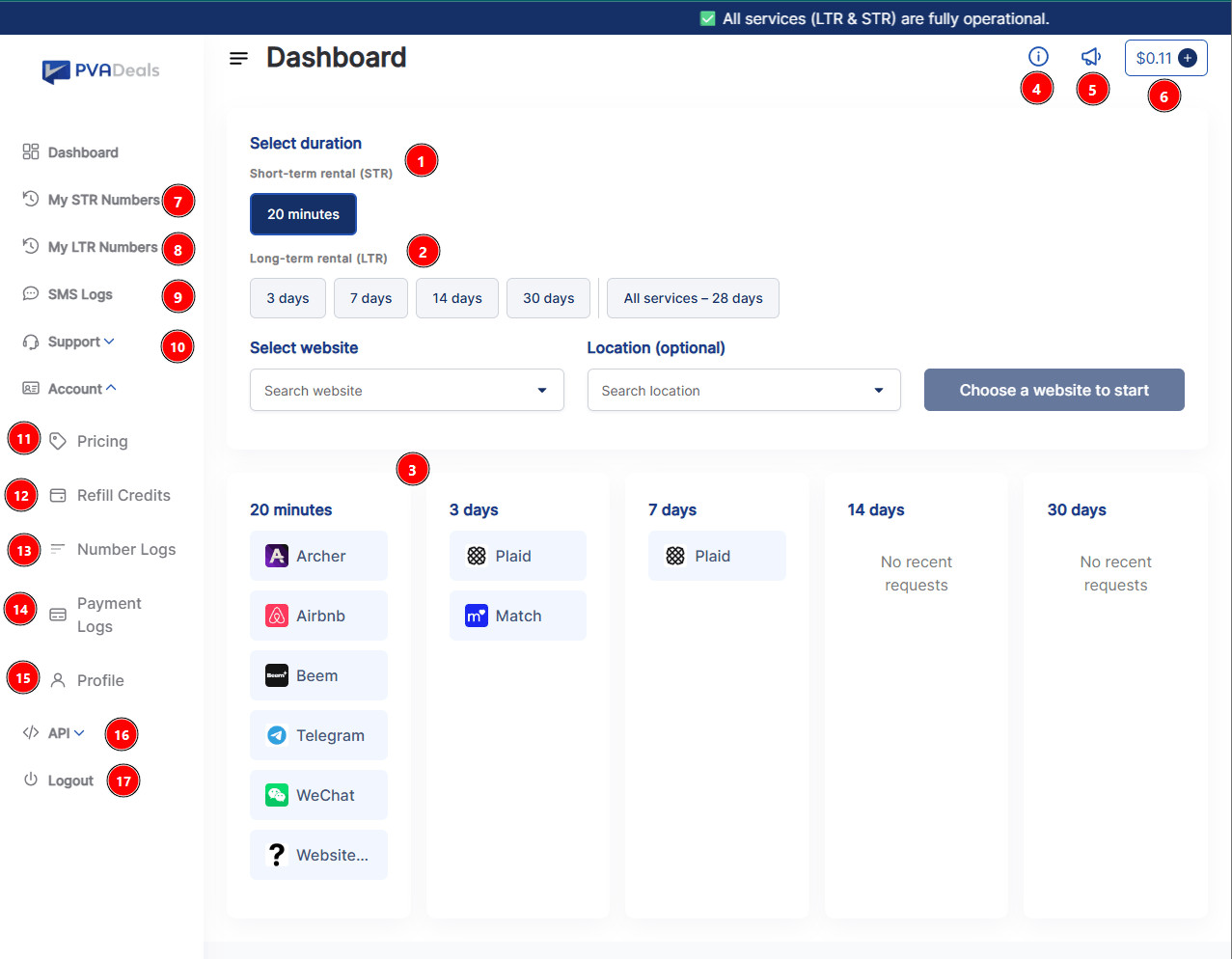
Short-term rental (STR) - 20 minutes: For one-time verifications. Rent a number for 20 minutes, receive the SMS code, and you’re done.
Long-term rental (LTR) - 3 / 7 / 14 / 30 days: For multiple verifications on the same number. Pick a duration and keep the number for as long as you need. “All services” (28, 30, 90 or 180 days, depending on country) gives access across all supported websites.
Recent Requests: Quick view of numbers you recently rented, grouped by duration. Click any service to reorder instantly.
Top Bar
Info: Quick tips and platform info.
Announcements: Latest updates, maintenance notices, and new service alerts.
Balance + Add: Your current credit balance. Click + to top up instantly.
Sidebar
My STR Numbers: All your 20-minute rentals and their received SMS codes.
My LTR Numbers: All your long-term numbers (3–30 days) with renewal and usage options.
SMS Logs: Full history of every SMS received on your numbers.
Support: Open tickets, chat with us, or browse help articles.
Pricing: View current prices for every website and rental duration.
Refill Credits: Top up your balance using crypto (BTC, LTC, DOGE, and more) or cards via Stripe (minimum $3 in crypto, $5 by Stripe).
Number Logs: Complete record of every number you’ve rented — active, completed, flagged, or expired.
Payment Logs: History of all your top-ups and transactions.
Profile: Update your name, password, country, and account settings.
API: Get your API key and docs to automate number rentals (500 requests/min).
Logout: Sign out of your account securely.
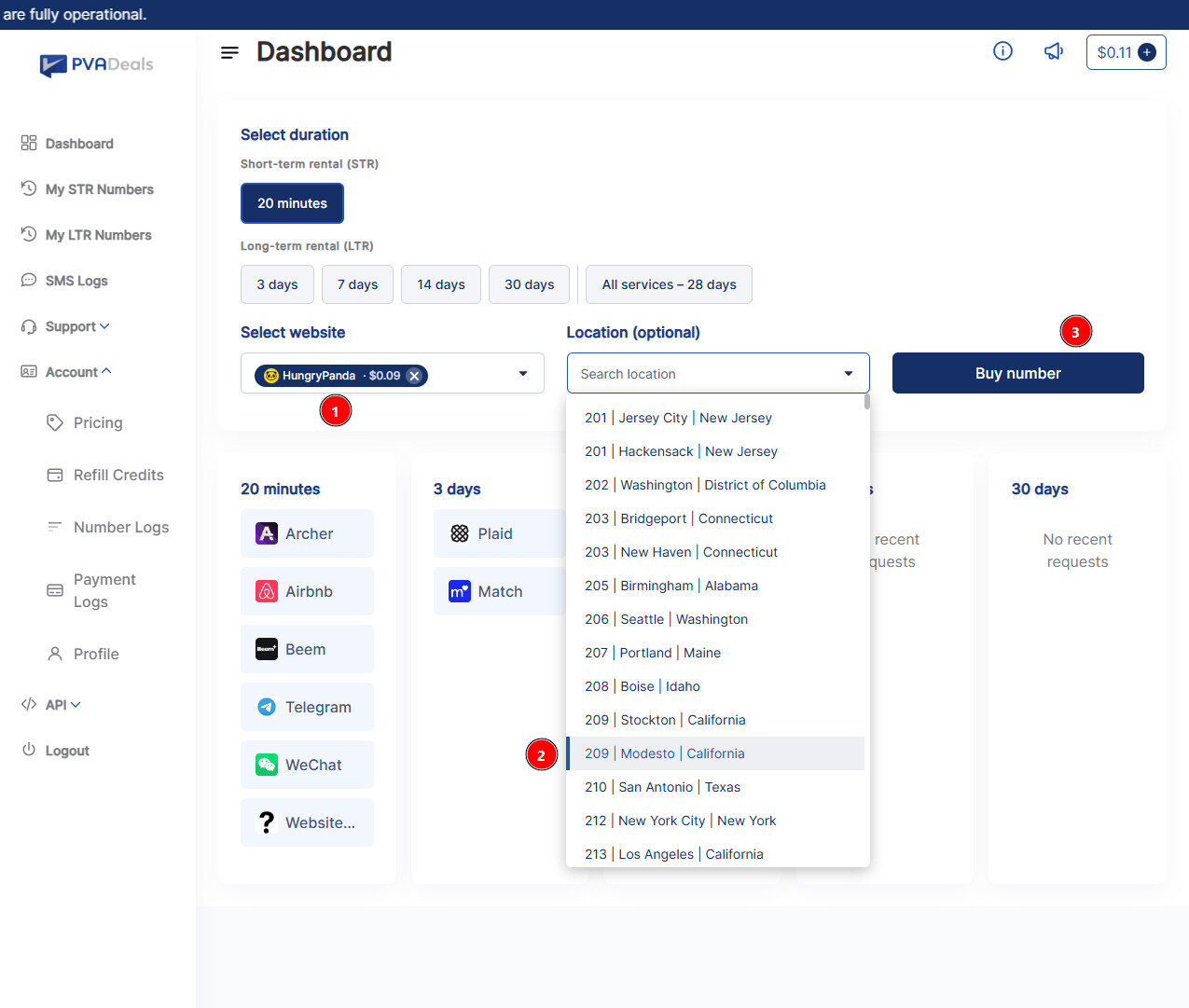
3. Get 20 minutes number
Select website: Search and pick the website you need the verification for (e.g., HungryPanda, Airbnb, Telegram). The price per rental is shown next to the name (e.g., $0.09). Click the ✕ to change your selection.
Location (optional): Choose a specific US area code / city if the service requires one (e.g., 209 | Modesto | California). Leave it blank to get any available number — faster and usually cheaper.
Buy number: Click Buy number to instantly rent a number. You’ll be redirected to the rental page where your SMS code will appear within 20 minutes. The cost is deducted from your balance.
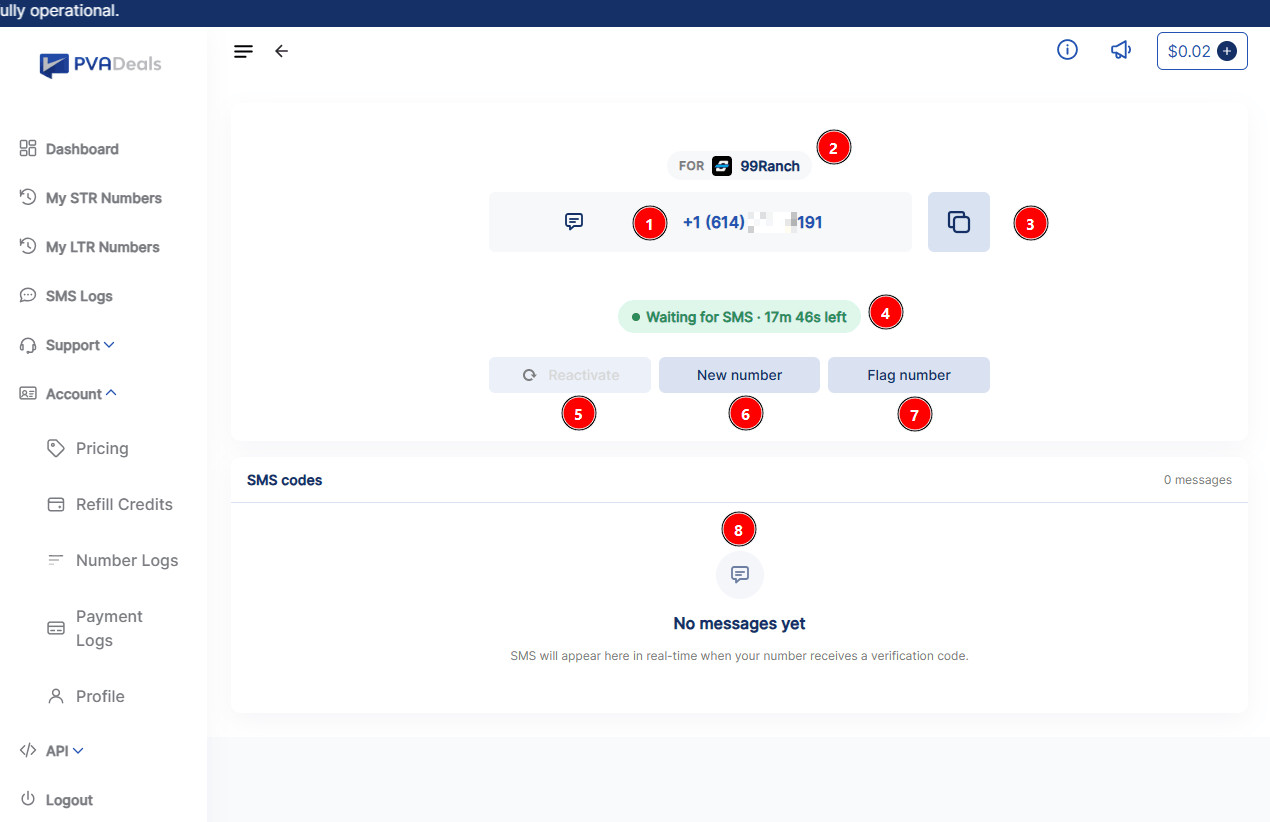
4. 20 minutes receive number - waiting for SMS
Your rented number: This is the phone number assigned to you. Copy it and paste it into the website/app where you need the verification code.
“FOR” tag: Shows which website this number is rented for (e.g., 99Ranch). The number is locked to this service only.
Copy icon: One-click copy of the full number — fastest way to paste it into the signup form.
Timer - “Waiting for SMS”: You have 20 minutes total for an STR rental. If no SMS arrives in that window, you’re automatically refunded.
Reactivate(grayed out until SMS arrives): After your first code is received, click Reactivate to get a second code on the same number (useful if the site asks you to verify again).
New number: Get a different one for the same website. Use this if the current number isn’t receiving the SMS.
Flag number: Report the number as bad (no SMS, blocked by the site, etc.) and get a full refund to your balance. Only works before any SMS is received and within the 20-minute window.
SMS codes box: Incoming SMS messages appear here in real-time. Once your code arrives, you’ll see it instantly — no refresh needed.
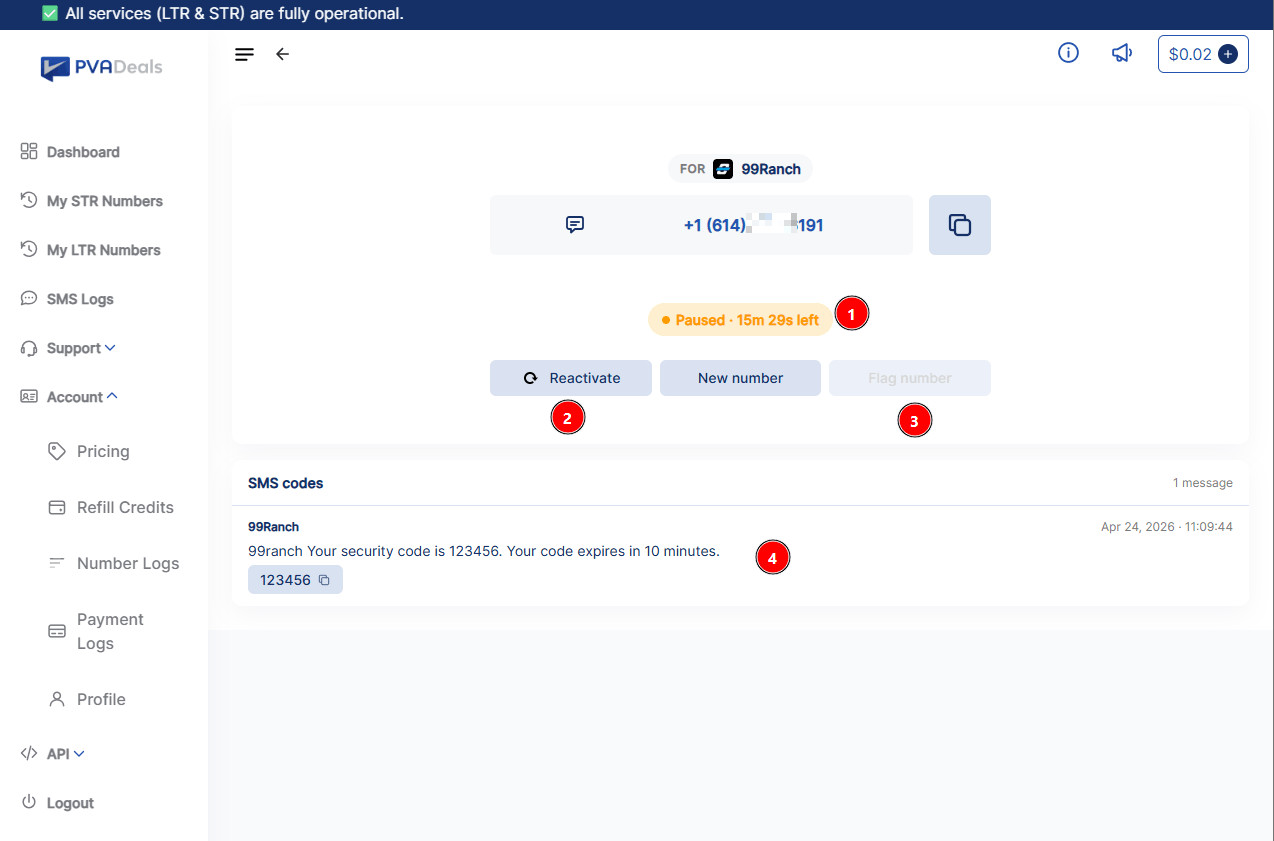
5. 20 minutes - SMS arrived
Status - “Paused”: The timer pauses once your first code is received. You still have time left on the rental if you want another code.
Reactivate(now active): Click Reactivate to receive a second SMS on the same number - useful if the website asks you to verify again. A small fee may apply depending on the service.
Flag number(now disabled): Flagging is no longer available because you already received an SMS. Since the number worked, it can’t be refunded.
SMS code: Your verification code appears here with the sender name, the full message, and a timestamp. Click the small copy icon next to the code to copy just the code for quick pasting.
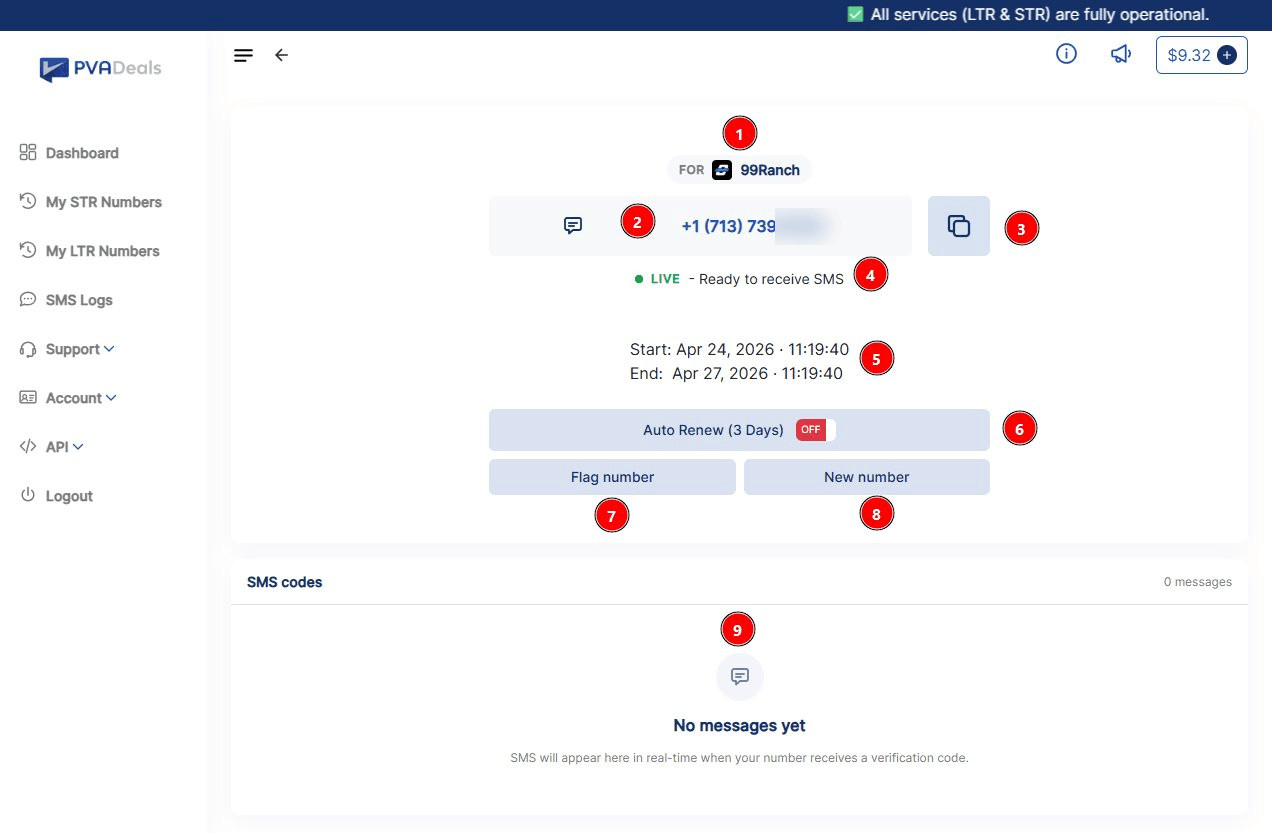
6. 3 days receive number - waiting for SMS
“FOR” tag: Shows which website this number is rented for (e.g., 99Ranch). Your LTR number is locked to this service for the full rental period.
Your rented number: The phone number assigned to you for the entire rental duration. Use it to receive multiple SMS codes across your rental window.
Copy icon: One-click copy of the full number.
Status - “LIVE · Ready to receive SMS”: Your number is active and listening for incoming messages. Unlike STR, there’s no countdown - the number stays live until the end date.
Start & End dates: Exact start and expiry time of your rental (e.g., 3 days from purchase). After the End date, the number is released automatically.
Auto Renew (3 Days)(OFF by default): Toggle ON to automatically renew the rental for another 3 days before it expires - so you never lose access to the number. Make sure you have enough credits. Toggle OFF anytime to stop future renewals.
Flag number: Report a bad number (not receiving SMS, blocked by the service, etc.) and get a refund. Allowed only within 24 hours of purchase and only if no SMS has been received yet.
New number: Switch to a different number for the same website. Useful if the current one isn’t working before you receive any SMS.
SMS codes box: All incoming messages appear here in real-time throughout the rental period. You can receive unlimited SMS codes as long as the rental is LIVE.
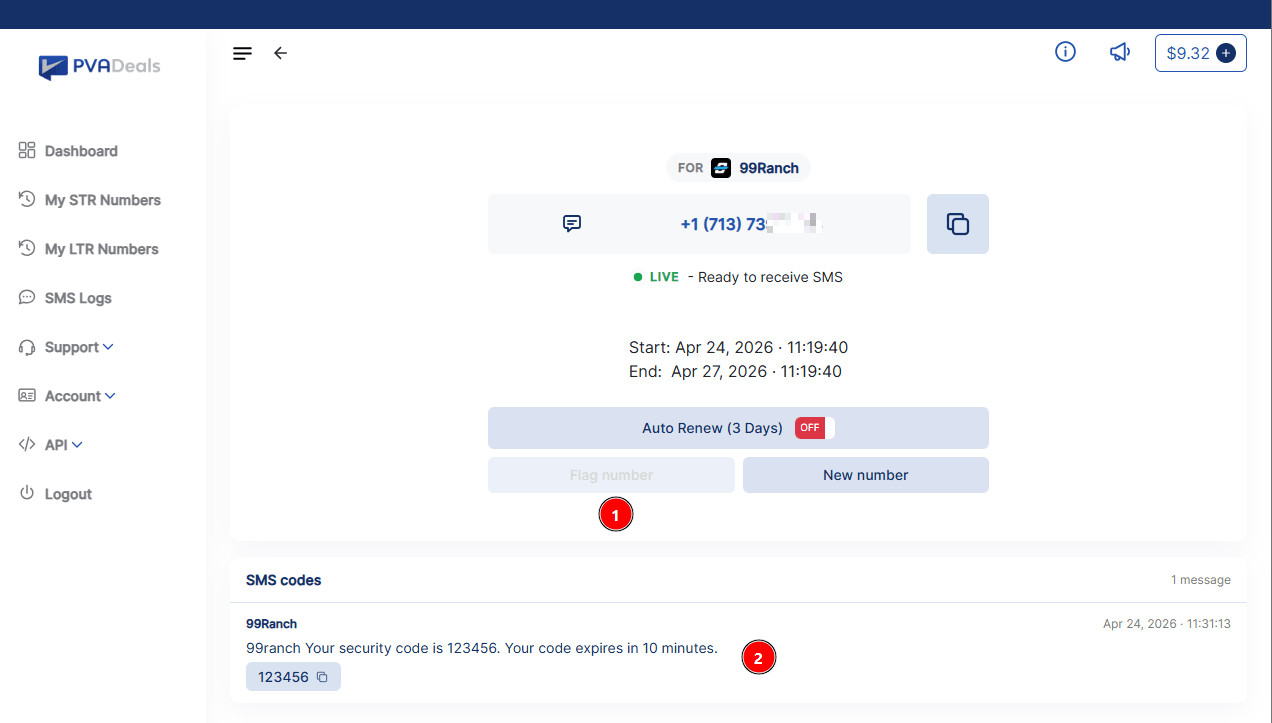
7. 3 days - SMS arrived
Flag number(now disabled): Once any SMS is received on your LTR number, flagging is locked. Since the number worked, it can’t be refunded. Auto Renew is still active if you want to extend the rental.
SMS code: Your verification code appears here with the sender name, the full message, and a timestamp. Click the copy icon next to the code to copy just the code. All future SMS messages on this number will stack up here until the rental ends.