

Discord Phone Verification Without Your Personal Number
Discord sometimes stops you with a phone verification screen: when you join a server that requires a verified phone, or when its safety system wants proof that you’re a person. If you don’t want to give Discord your personal number, a second number can receive the code instead.
This guide explains when Discord asks for a phone, which numbers it refuses, and how to verify with a real US or UK mobile number. It’s about keeping your own number private, not about getting around a ban.
When does Discord ask for a phone number?
Discord’s help center lists two common reasons.
A server requires it. Server owners pick a verification level, and at the highest level members “will also need to have a verified phone number attached to their Discord account”. Discord adds that “having a verified phone number supersedes all other requirements”, so a verified phone gets you into servers with lower levels too.
Discord’s safety system asks for it. Discord says “you may be required to verify your email and phone number as part of our safety system”, for example if you:
- joined multiple servers in a short period of time
- sent direct messages to many users who aren’t your friends
- posted messages faster than a human can manage
- used third-party clients or modifications to Discord
You can also add a phone for SMS two-factor authentication, but Discord itself doesn’t recommend it: “it can only be enabled once you’ve already set up an Authenticator App.”
Which phone numbers does Discord accept?
Discord is clear about this: “VOIP, Burner, or Landline numbers cannot be used.” It asks you to make sure “the number you are trying to use is associated with a mobile device.”
| Number type | Works for Discord? | Why |
|---|---|---|
| Free public receive-SMS number | Rarely | Usually VoIP, and often already on another Discord account |
| VoIP or app number (Google Voice, TextNow and similar) | No | Discord doesn’t accept VoIP numbers |
| Landline | No | Discord needs a mobile number |
| Fresh non-VoIP (mobile) number | Yes | A real carrier line that isn’t on another Discord account |
Two more rules matter when you pick a number:
- One account per number. “A phone can only be registered with one Discord account at a time.”
- A waiting period after removal. “Once a number has been removed, there is a waiting period before the number can be used on an account again.”
A non-VoIP number is a real mobile number from a carrier, so Discord’s check sees an ordinary phone. See how to check if a number is VoIP, or read about VoIP vs non-VoIP numbers.
How to verify Discord with a non-VoIP number
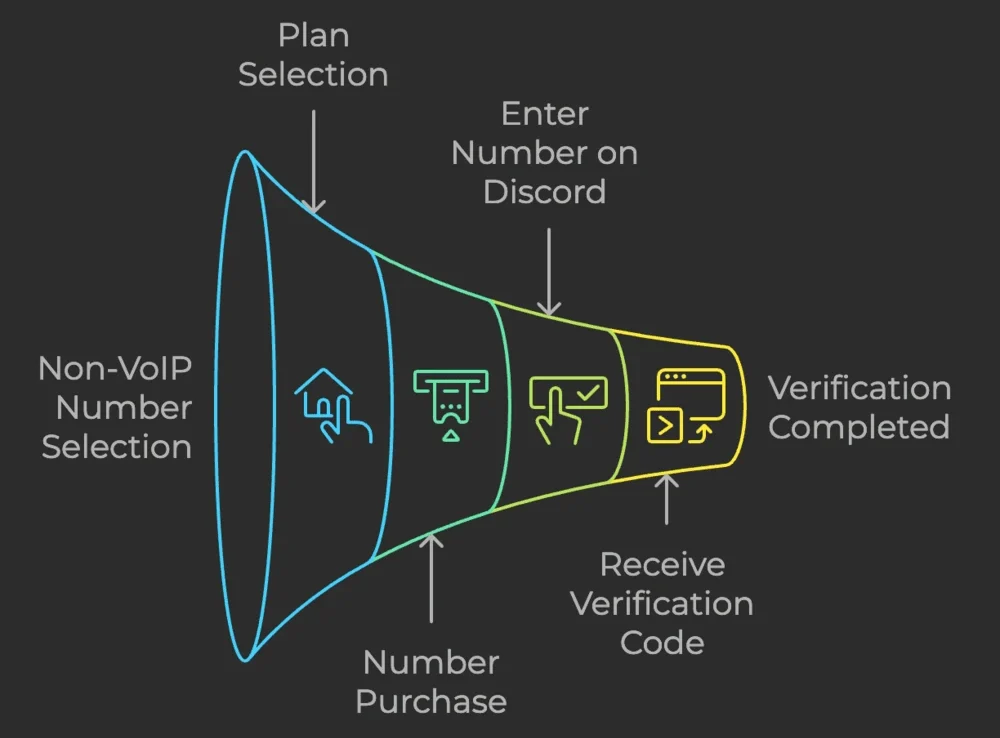
- Create a free PVADeals account and add credits: crypto from $3, or a card through Stripe from $5.
- Choose Discord and the country: the United States or the United Kingdom.
- Pick a rental. A short-term number lasts 20 minutes; a long-term number lasts 3, 7, 14 or 30 days. See the prices below.
- Enter the number on Discord’s phone verification screen. Select the right country code first (+1 for the US, +44 for the UK). Discord sends the code by SMS.
- Copy the code from your PVADeals dashboard, where it appears as soon as it arrives, and enter it on Discord. Discord may ask for your password to confirm.
Short-term or long-term?
A short-term number (20 minutes) is enough for a one-time verification, such as joining a server that requires a phone. Once Discord has verified it, the number stays on your account even after the rental ends.
Choose a long-term number (3 to 30 days, renewable) if Discord might send you codes later, for example for SMS two-factor authentication. Don’t make a 20-minute number your only backup: use an authenticator app, which is what Discord recommends anyway.
To take the number off your account later, go to User Settings > My Account and press Remove next to it, then enter your password. On mobile the button is Remove Phone Number. Keep your email address up to date too. Discord says that if you forget which email an account uses, support can’t look it up or remove the number for you.
Discord phone verification errors and fixes
Discord’s help center names the errors you might see:
- Invalid phone number: “the phone number was not entered correctly or is unusable.” Check the country code, then use a mobile number rather than a VoIP one.
- Phone is already registered (“This phone number is unable to be associated with this account”): the number is on another Discord account. Use a different number.
- Rate limit / recently used: the number “is currently in a timeout period”. Discord asks you to “wait 24-48 hrs before verifying your phone number once more.”
- Captcha: finish the captcha and try again.
If an eligible PVADeals number receives no SMS during the rental, its cost comes back to your balance automatically as store credit, so you can try another one.
Keep your personal number off Discord
A real non-VoIP number verifies your Discord account without your own number. See our US and UK phone numbers, or read how to get a temporary phone number for verification for other apps.
Discord number prices
| Country | 20 minutes | 3 days | 30 days |
|---|---|---|---|
 United StatesUS | $0.09 | $0.70 | $2.25 |
 United KingdomUK | $0.20 | $0.70 | $2.25 |
 AustraliaAU | $0.30 | Not sold | Not sold |
All services, one number for any website: $12.99 for 28 days in the US; $6.99 for 30 days or $11.99 for 90 days in the UK; $22.99 for 30 days in Australia. Prices in the PVADeals app on Nov 5, 2026.
Frequently asked questions
Can I verify Discord without my own phone number?
Why does Discord say my number can’t be used?
Can I use the same phone number on two Discord accounts?
Can I remove my phone number from Discord after verifying?
Which number should I use for Discord: US or UK?
What if Discord’s code doesn’t arrive?
Related articles
Fiverr Phone Verification Without Your Personal Number
Aug 2, 2023
PayPal Without a Phone Number? Which Numbers Work for Verification
Aug 1, 2023
Yahoo Verification Code Without Your Personal Number
Jul 31, 2023
Can You Use a Temporary Phone Number for Google Voice?
Jul 28, 2023

eBay Phone Verification Without Your Personal Number
Jul 27, 2023
How to Make a Match Account Without Your Personal Number
Jul 27, 2023