

How to Get a Temporary Phone Number for Verification
Almost every website now asks for a phone number before it lets you in. A temporary phone number lets you receive that verification code without handing over your personal number, and without a second SIM card.
This guide explains which kinds of temporary number websites actually accept, when a free number is fine and when it isn’t, and how to choose the right rental for the account you’re creating.
What is a temporary phone number for verification?
It’s a number you use for a short time to receive a one-time code by SMS. You enter it where a website asks for your phone, the code arrives, and you finish signing up. Your personal number never reaches the website’s database, its marketing list or its next data breach.
With PVADeals, the number is a real non-VoIP mobile number, rented to you alone. You read the code on your dashboard, from anywhere in the world.
Which temporary numbers do websites accept?
Not every number that can receive a text will pass a verification check.
| Number type | Works for verification? | Why |
|---|---|---|
| Free public receive-SMS number | Rarely | Shared by thousands of people and often already used on the same site |
| VoIP or app number (Google Voice, TextNow and similar) | Often not | Many sites check the line type and reject internet-based numbers |
| Fresh non-VoIP (mobile) number | Usually | A real carrier line that looks like an ordinary phone |
Websites reject numbers for two main reasons. Some check whether a number is VoIP; Match, for example, says “VOIP (Voice Over IP) carrier numbers can’t be used for SMS Verification”. Others limit how many accounts one number can verify; Google shows “This phone number has been used too many times for verification”.
A fresh non-VoIP number avoids both. Every PVADeals number is new and has never been sold before. Not sure what kind of number you have? See how to check if a number is VoIP, or read VoIP vs non-VoIP numbers.
Free or private?
A free number is fine when nothing is at stake: a one-off sign-up you’ll never use again. PVADeals gives away free US and UK numbers for exactly that: see our free temp number page.
For anything you plan to keep, use a private number. Everyone can read a public number’s texts, so anyone who sees your code, or a later password-reset code, could get into your account. We compare the options in detail in how to receive SMS online in the USA.
How to get a temporary phone number for verification
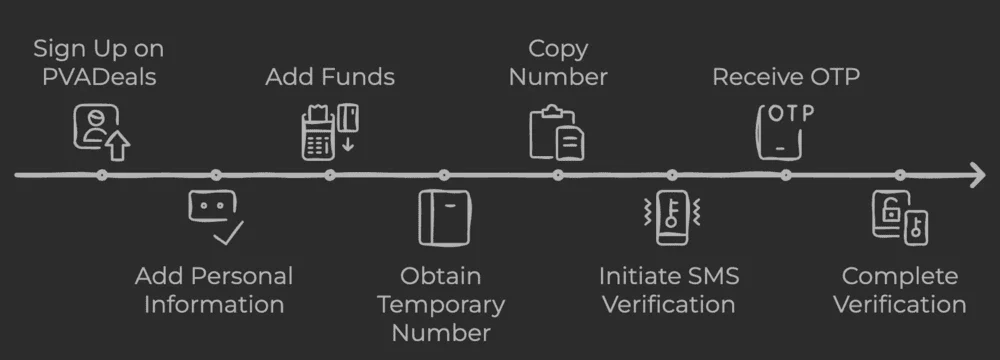
- Create a free PVADeals account and add credits: crypto from $3, or a card through Stripe from $5.
- Choose the website you’re verifying and the country. The app lists 1,500+ websites, with per-website numbers in the United States and the United Kingdom, and 20-minute numbers in Australia.
- Pick a rental length: 20 minutes, or 3, 7, 14 or 30 days. Prices are shown before you buy.
- Enter the number on the website and choose to get the code by text message. PVADeals numbers receive SMS only.
- Copy the code from your dashboard as soon as it arrives, and finish signing up.
Which rental should you choose?
| Rental | Lasts | Best for |
|---|---|---|
| Short-term | 20 minutes | One code for an account you won’t need to verify again |
| Long-term | 3, 7, 14 or 30 days, renewable | Accounts that text you again at login, recovery or for 2FA |
| All services | 1 month or more | One number for any website |
The question to ask is: will this website text me again? Many do, when you log in on a new device, reset a password or change your details. If the answer is yes, a 20-minute number will be gone by then, because reuse after the rental isn’t guaranteed. Rent long-term and turn on auto-renew, and add a recovery email or authenticator app where the site allows it.
All services numbers are also available in Canada, Hong Kong, Indonesia and Australia. See the price estimator, or our US and UK phone number pages.
Guides for popular websites
Each website asks for a number differently, and some use it for much more than sign-up. Our guides explain the rules and the rental to choose:
- Email and accounts: Gmail, Yahoo, Outlook, AOL, Apple, email without a phone number
- Messaging and social: WhatsApp, Telegram, Signal, Discord, Instagram, Facebook, Snapchat, TikTok, YouTube
- Dating: Tinder, Hinge, Bumble, Match, OkCupid, POF
- Gaming: Battle.net, Overwatch, Steam
- Rides and delivery: Lyft, Uber, DoorDash
- Money: PayPal, Venmo, Cash App, Coinbase, Stripe
- Shopping and streaming: Netflix, Temu, Walmart
- Marketplaces and work: eBay, Poshmark, Mercari, Craigslist, Upwork, Fiverr
- AI and developers: ChatGPT, Twilio, AWS
- Google Voice: temporary phone number for Google Voice
- Second numbers: virtual phone numbers, how to get a second phone number, burner numbers, virtual SIM cards, Google Voice alternatives, TextNow alternatives
If the code doesn’t arrive
- Check the country code matches the number you rented: +1 for the US, +44 for the UK.
- Choose a text message, not a call.
- Request the code again after a minute or two.
- Still nothing? If an eligible number receives no SMS during the rental, its cost comes back to your balance automatically as store credit.
More fixes: not receiving verification codes.
Keep your personal number private
A temporary non-VoIP number from PVADeals verifies your accounts without your personal number. Use it, and follow the terms of each website you sign up for.
Frequently asked questions
What is a temporary phone number for verification?
Is there a free temporary number for verification?
Are temporary numbers legal to use?
How do I choose the right rental?
Can I use a temporary number for two-factor authentication (2FA)?
How do I pay?
Related articles

How to Create an Upwork Account (Formerly oDesk)
Jun 1, 2024

How to Open a Green Dot Account: Phone and ID Checks
May 24, 2024
How to Change the Phone Number on Your Gmail Account
Apr 24, 2024

Temporary Phone Number for Gmail Verification
Apr 24, 2024
SoFi Phone Verification: Codes and Changing Your Number
Apr 22, 2024

Can You Make a Snapchat Without a Phone Number?
Apr 22, 2024