

Create an Amazon Account Without a Phone Number
You don’t need a phone number to create an Amazon account. On the Amazon website, an email address is enough. Amazon may still ask for a mobile number later, to secure the account or confirm a sign-in.
This guide explains when Amazon asks for a phone, how to avoid giving it your personal number, and when a second number is worth it.
Can you create an Amazon account without a phone number?
Yes. Amazon’s help pages say adding a mobile phone number to your account is optional. The number gives you quick sign-ins, easy password recovery and security notifications, but you can create the account with an email address alone. Amazon may ask you to confirm that you own the email address before it creates the account.
Amazon also offers the reverse, an account that uses a mobile number instead of an email address, but you don’t have to choose it.
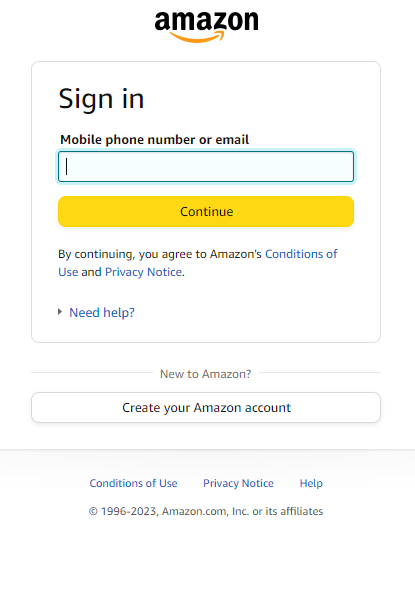
How to create an Amazon account with just an email
- Go to the Amazon sign-in page and choose Create your Amazon account.
- Enter your name and email address, and choose a password.
- Verify your email. Amazon sends a code to the address you entered.
- Skip the phone number if Amazon offers to add one. It’s optional.
You can add or change a number later in Your Account > Login & Security: select Edit next to the detail you want to change.
When Amazon asks for a phone number anyway
Even without a number on file, Amazon may bring one up in a few places:
- Sign-in checks. Amazon may ask you to complete an extra step when you sign in, by entering a six-digit passcode it sends to the email address or mobile number on your account. With no number on file, the code goes to your email.
- 2-Step Verification. Amazon lets you receive the security code by text message or with an authenticator app. Choose the app if you don’t want to give Amazon a phone number at all.
- Seller accounts. Selling on Amazon is different: Amazon asks for your business details, a phone number and a video call with an Amazon associate. That number is part of your identity check, so use one you’ll keep.
Amazon also links a mobile number to one account at a time: if you verify it on another account, it moves there.
When a second number makes sense
Most shoppers can leave the number out. A second number helps when you want text-message codes but would rather not give Amazon your personal number, or when you manage a separate account and need a different number for it.

Amazon may text the same number again whenever it checks a sign-in, so a number you keep is better than a 20-minute one:
- Create a free PVADeals account and add credits: crypto from $3, or a card through Stripe from $5.
- Choose Amazon and the country of your Amazon account: the United States or the United Kingdom.
- Pick a long-term rental of 3, 7, 14 or 30 days, and turn on auto-renew. A short-term number (20 minutes) is gone after the first code. See the prices below.
- Add the number in Login & Security, or wherever Amazon asks for it, and choose to get the code by text message. PVADeals numbers receive SMS only.
- Copy the code from your PVADeals dashboard, where it appears as soon as it arrives.
Need one number for Amazon and other websites? An All services number works on any website.
Keep your Amazon account safe without a phone
- Use an authenticator app for 2-Step Verification instead of text messages.
- Keep your email secure, because Amazon sends sign-in codes there when there’s no number on file.
- Before a rented number ends, change it to a number you keep or switch 2-Step Verification to the authenticator app, so Amazon never sends a code to a number you no longer have.
Shop on Amazon without your personal number
An email address is all Amazon needs to get started. When you do want a number on the account, a real non-VoIP number keeps your own private. See our US and UK phone numbers, or read how to get a temporary phone number for verification.
Amazon number prices
| Country | 20 minutes | 3 days | 30 days |
|---|---|---|---|
 United StatesUS | $0.30 | $1.25 | $4.50 |
 United KingdomUK | $0.45 | $1.50 | $4.80 |
 AustraliaAU | $0.30 | Not sold | Not sold |
All services, one number for any website: $12.99 for 28 days in the US; $6.99 for 30 days or $11.99 for 90 days or $14.99 for 180 days or $18.99 for 365 days in the UK; $22.99 for 30 days in Australia. Prices in the PVADeals app on Nov 15, 2026.
Frequently asked questions
Can I create an Amazon account without a phone number?
Why does Amazon ask for my phone number?
Can I turn on Amazon 2-Step Verification without a phone number?
Can I use the same phone number on two Amazon accounts?
Can I use a temporary number for an Amazon seller account?
What if Amazon’s code doesn’t arrive?
Related articles
Can You Create an Apple Account Without a Phone Number?
Sep 22, 2023

Can You Play Overwatch Without a Phone Number?
Dec 25, 2023

How to Change Your Blizzard Phone Number on Battle.net
Dec 22, 2023
Blizzard Phone Verification Without Your Personal Number
Dec 21, 2023

Bumble Verification: Phone Number and Photo Checks
Oct 2, 2023

How to Create a Gmail Account Without a Phone Number
Oct 27, 2026