

How to Receive SMS Online in the USA
You can receive SMS online with a US number without owning a US phone, from anywhere in the world. There are three ways to do it, and they’re not equal: two of them put your messages where anyone can read them.
This guide compares the three, explains why websites often reject public numbers, and shows how to receive SMS online on a private US number in a few minutes.
Three ways to receive SMS online with a US number
| Free receive-SMS sites | PVADeals free US number | Private US number | |
|---|---|---|---|
| Cost | Free | Free | See the price estimator |
| Who can read your texts | Anyone | Anyone | Only you |
| Works for verification | Rarely | Sometimes | Usually |
| Keep the number | No | No | Yes, with a long-term rental |
| Best for | Nothing important | Quick, low-stakes sign-ups | Accounts you want to keep |
Free receive-SMS websites list public US numbers and show every text those numbers receive. They cost nothing, but the numbers are shared by thousands of people.
PVADeals’ free US non-VoIP number is a real mobile number we give away. No sign-up is needed: enter it on a website and the codes it receives appear on the page, live. Everyone can see them too, so it’s best for sign-ups that don’t matter.
A private US number is rented to you alone. Only you see its messages, on your PVADeals dashboard, and you can keep it for as long as you renew it.
Why websites reject public numbers
A public number has usually been used by hundreds of people on the same websites before you. Many sites limit how many accounts one number can verify. Gmail, for example, shows “This phone number has been used too many times for verification” (what it means). Others block numbers they’ve seen on receive-SMS sites altogether.
There’s a security problem too. Anyone who reads your code on a public page can try to use it, and if the site later sends a password-reset code to that number, the next person to read it could take over your account.
A private non-VoIP number avoids both problems. It’s a real line from a major US mobile carrier, new and never sold to anyone before, so websites see an ordinary US mobile phone. Read more about VoIP vs non-VoIP numbers.
How to receive SMS online on a private US number
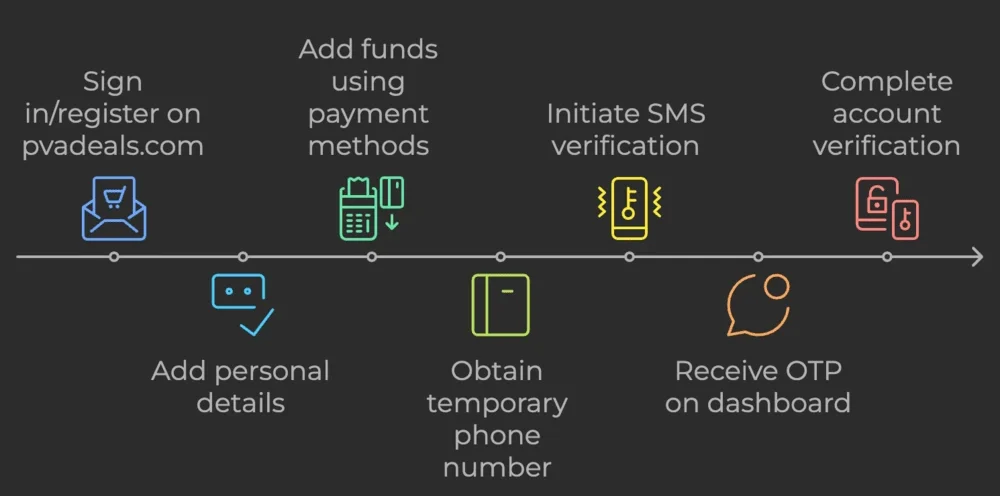
- Create a free PVADeals account and add credits: crypto from $3, or a card through Stripe from $5.
- Choose the website you need a code from, and the United States as the country. Choosing a US state or area code is optional.
- Pick a rental. A short-term number lasts 20 minutes, with unlimited SMS from that website; a long-term number lasts 3, 7, 14 or 30 days.
- Enter the number on the website, with the +1 country code, and ask for the code by text message.
- Read the SMS on your dashboard. It appears as soon as it arrives; copy the code and finish signing up.
Short-term, long-term or All services?
- Short-term (20 minutes) is the cheapest way to receive one code. Reuse after the 20 minutes isn’t guaranteed, so don’t use it for an account that will text you again.
- Long-term (3 to 30 days, renewable) keeps the same number, so you can receive login and recovery codes later. Turn on auto-renew to keep it for months.
- All services gives you one US number that works on any website, with unlimited SMS for the full term.
Prices for each website are shown in the app before you buy. See the price estimator, or our US phone numbers page for the websites that offer US numbers.
Receiving SMS from outside the USA
A US number works from anywhere. You don’t need a US SIM card or a US phone plan: the messages go straight to your PVADeals dashboard, wherever you are. That makes it useful for US-only services, for keeping a sign-up separate from your personal number, or for testing a service before you commit to it.
Need a UK number instead? See our UK phone numbers or the free UK number.
If the SMS doesn’t arrive
- Check the country code. A US number needs +1.
- Choose a text message, not a call: PVADeals numbers receive SMS only.
- Request the code again after a minute or two.
- Still nothing? If an eligible number receives no SMS during the rental, its cost comes back to your balance automatically as store credit.
Keep your codes to yourself
Free numbers are fine for sign-ups that don’t matter. For anything you plan to keep, receive your SMS on a private US number that only you can read. Verifying a specific website? See our guides for Gmail, WhatsApp and Google Voice, or read how to get a temporary phone number for verification.
Frequently asked questions
Can I receive SMS online in the USA for free?
Is it safe to receive a verification code on a public number?
How long does a US number last?
Can I use a US number from outside the USA?
Can I send texts or take calls on the number?
What if the SMS doesn’t arrive?
Related articles
How to Get a Temporary Phone Number for Verification
Jun 6, 2024

How to Create an Upwork Account (Formerly oDesk)
Jun 1, 2024

How to Open a Green Dot Account: Phone and ID Checks
May 24, 2024
How to Change the Phone Number on Your Gmail Account
Apr 24, 2024
Temporary Phone Number for Gmail Verification
Apr 24, 2024
SoFi Phone Verification: Codes and Changing Your Number
Apr 22, 2024